

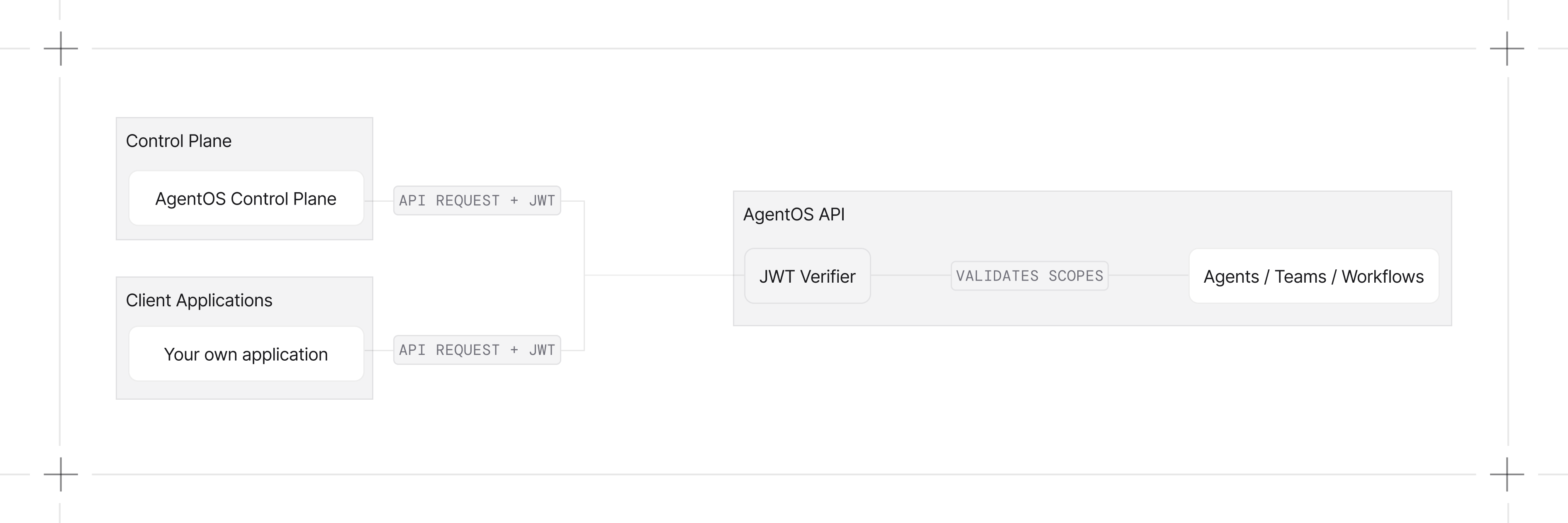
Quick Start
Enable RBAC when initializing AgentOS:JWT_VERIFICATION_KEY environment variable to your public key in your .env file or export it directly in your terminal:
Scope Format
RBAC uses a hierarchical scope format:Complete Scope Reference
Admin Scopes
System Scopes
Agent Scopes
Team Scopes
Workflow Scopes
Session Scopes
Memory Scopes
Knowledge Scopes
Metrics Scopes
Evaluation Scopes
Trace Scopes
Schedule Scopes
Approval Scopes
Default Scope Mappings
AgentOS automatically maps endpoints to required scopes.- System
- Agents
- Teams
- Workflows
- Sessions
- Memories
- Knowledge
- Metrics
- Evals
- Traces
- Schedules
- Approvals
Custom Scope Mappings
Customize or extend the default scope mappings using the JWT middleware:JWT Token Structure
Your JWT tokens should include:Example Tokens
Read-only access:Configuration Options
Configure JWT verification usingAuthorizationConfig:
Excluded Routes
These routes are excluded from RBAC checks by default:/, /health, /docs, /redoc, /openapi.json, /docs/oauth2-redirect
Error Responses
Examples
Basic RBAC
Basic RBAC example
Per-Agent Permissions
Grant specific permissions to specific agents
Developer Resources
AuthorizationConfig Reference
Configuration options for JWT verification
JWTMiddleware Reference
Complete JWT middleware class reference